Public booking
Anonymous page to pick a bookable service and a real slot. It creates a Draft work order and a Scheduled appointment with a technician — not a service request, not a CMS member, and not a portal identity.
Public · /book/{workspace} · title Book an appointment. Included with Web. HTTPS in production.
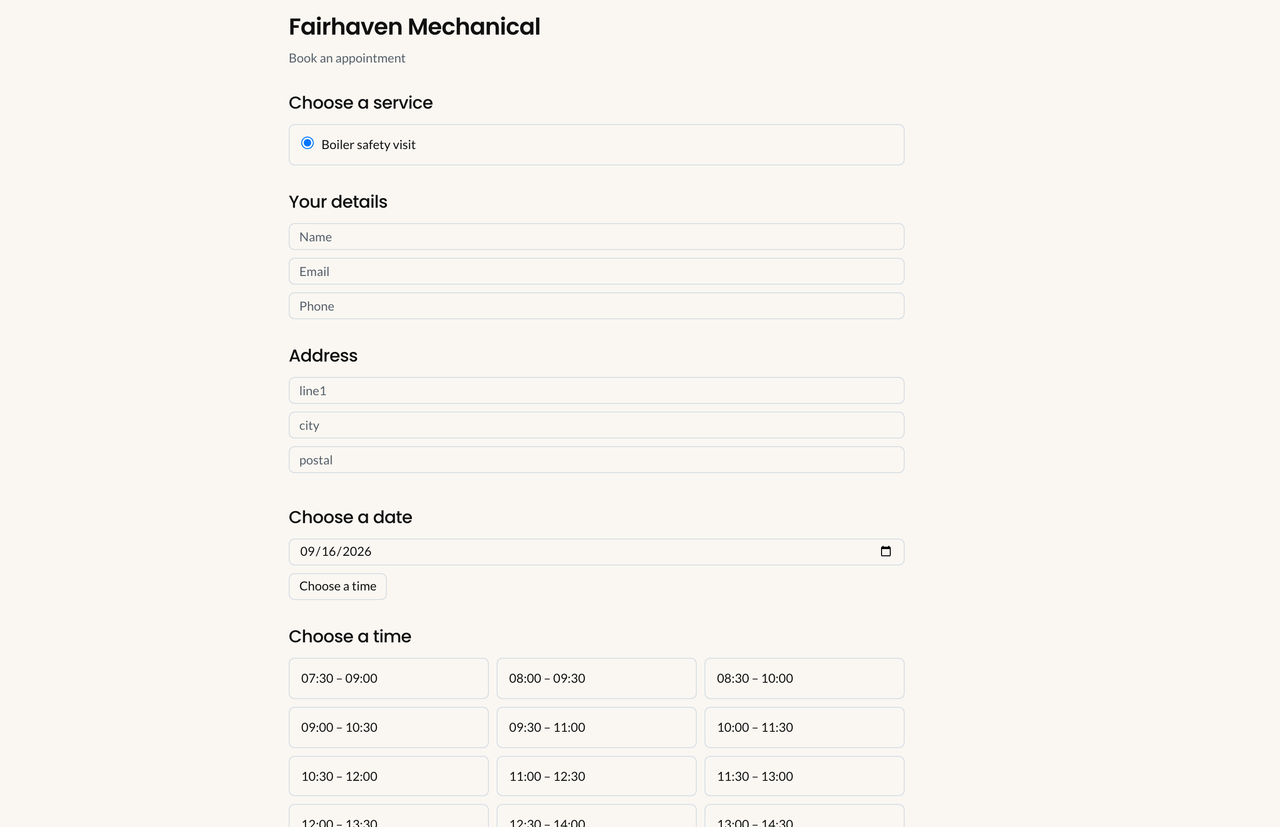
Public booking. A confirmed booking creates a Draft work order and a Scheduled appointment — not a service request.
Enable
Section titled “Enable”Settings → Online scheduling (online_scheduling.view / manage) — enable policy. Settings → Bookable services — map a work-order type, Visible on public booking page, Active. Share https://{host}/book/{workspace} (APP_URL must match).
Notice: Online scheduling stays off until you enable it. Multi-technician types cannot be offered: Multi-technician team requirements cannot be booked online in this version.
Guest form
Section titled “Guest form”Required: service, name, email, address line 1, date, time. Optional phone, city/postal, notes. A displayed slot is not held. Recheck at submit. Stale: That time is no longer available. Choose another slot.
Times use the site timezone (then tenant, else UTC — not the browser). Travel time is skipped on this path.
What a submission creates
Section titled “What a submission creates”| Record | Result |
|---|---|
| Customer | Match by email, else create |
| Contact | Match by email, else create — still not portal |
| Site | Match address, else create |
| Service request | No |
| Work order | Draft |
| Appointment | Scheduled |
| Technician | First eligible (hours, time off, conflicts, area, qualifications). Travel time skipped. |
| Invoice / portal | No / No |
Not Auto-Assign / Find candidates. Office Opens the Draft before Field can execute.
If Communications type Appointment confirmed is on, the same first-schedule intent may email. If the type is off, the guest still sees the success page — they simply get no email.
Manage
Section titled “Manage”/book/{workspace}/manage/{token}. Cancel sets the appointment Cancelled; the work order stays Draft. Reschedule uses the same online scheduling cutoffs. Office can always move the visit on Dispatch.
What-if
Section titled “What-if”If no slots appear: policy off; no Active bookable service with Visible on public booking page; no eligible technician hours; blackout; APP_URL mismatch. See Booking troubleshooting.
If you look in Service requests: the booking is not there. Open Work orders (Draft).
Related: Online scheduling, Portal.