Customer portal
Authenticated self-service for an invited customer: documents, requests, and (when enabled) paying invoices. It is not the office CMS, not Field, and not the public booking page.
Path /portal/{workspace} · login /portal/{workspace}/login · capability + plan feature customer_portal
Invitation mail needs a queue worker and SMTP.
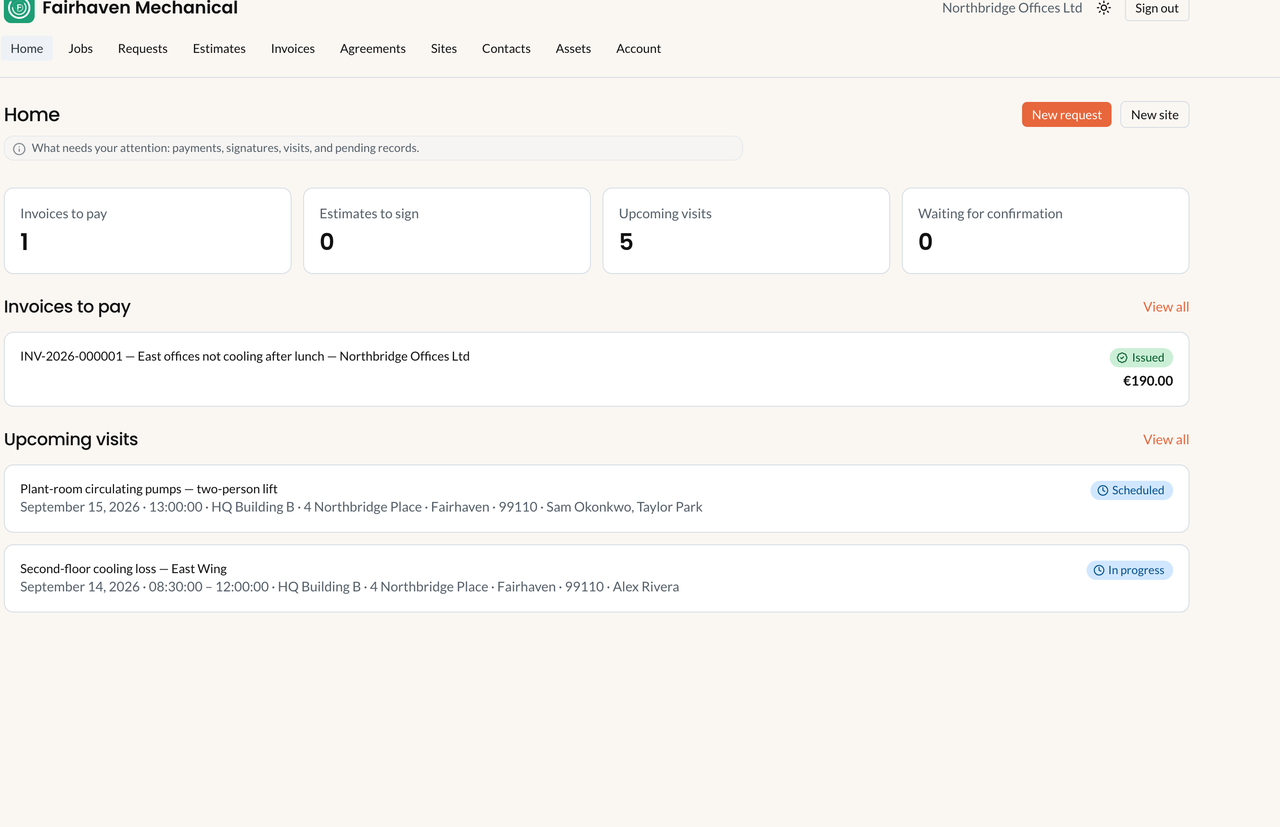
Portal home. Sample data. Magic-link identity — not a CMS member, not Field, and not public booking.
Three customer-facing surfaces
Section titled “Three customer-facing surfaces”| Surface | Who | What it is |
|---|---|---|
| This page | Invited customer, magic-link session | Customer-scoped records for one workspace |
| Public booking | Anonymous guest | /book/{workspace} — Draft work order + Scheduled appointment |
| Public document tokens | Anyone with the link | /e/{token} estimate, /i/{token} invoice — not a portal login |
Invite a customer
Section titled “Invite a customer”- Capability and plan feature
customer_portal. Permissioncustomers.update. - Customers → Customers → open the customer. Right column Customer portal → Invite to portal.
- Type Email (free text — not a Contact picker). Confirm Send a portal invitation to :email? Expected: Invitation sent. Status Invitation pending.
- Guest opens
/portal/{workspace}/invite/{token}. Veldriq creates or reuses the portal identity and signs them in. There is no password form, no 2FA, and no terms screen.
| Status | Meaning | Office actions |
|---|---|---|
| Invitation pending | Token valid for 7 days. | Resend invitation (new token). There is no Cancel invitation button. |
| Active | Grant in force. | Revoke access — Revoke portal access for :email? History stays intact. |
| Revoked | Cannot sign in to this customer. | Invite again to restore. |
Expired token: This invitation is invalid or has expired. Revoke does not invalidate public /e/{token} or /i/{token} links.
Later login: Email me a sign-in link. Flash: If an account exists, we sent a link. This is not Organization → Members.
What the customer sees
Section titled “What the customer sees”Nav (when matching capabilities are on): Home · Services · Requests · Book service · Estimates · Invoices · Agreements · Sites · Contacts · Assets · Account.
| Area | Customer can | Cannot |
|---|---|---|
| Requests | Submit request — creates a service request for office | This is not public booking and does not pick a slot |
| Services | Upcoming appointments and service history (report PDFs) | Edit the work order, Dispatch, or Field |
| Book service | Pick a portal-visible bookable service and a slot | Still not Auto-Schedule |
| Estimates | Accept / Decline / Request changes on a Sent snapshot | Accept does not create a work order |
| Invoices | Issued invoices, outstanding, PDF, Pay invoice when tenant Online payments is on | Plan invoices / platform Stripe |
| Agreements | Read coverage, dates, included/remaining visits | Edit, cancel, or generate invoices |
| Sites / Contacts / Assets | Create (status Pending review) | Operational until office Approve |
| Findings | — | Not shown in the customer portal in V1 |
What-if
Section titled “What-if”If no invitation mail: email typed, pending row, queue worker, SMTP, then Resend invitation.
If they cannot sign in: grant Active? Same workspace slug? Magic-link received?
If Pay invoice is missing: Online payments off, invoice not Issued, or outstanding is 0.
See Portal issues. Do not publish demo passwords in this documentation.
Related: Online scheduling, Customers.