Field PWA
The technician execution surface included with Veldriq Web. Same Laravel origin, same login as the office. It is not Veldriq Field (the separately sold Flutter app) and not a second office CMS.
Command palette → Field · /app/w/{workspace}/field (not a primary sidebar item)
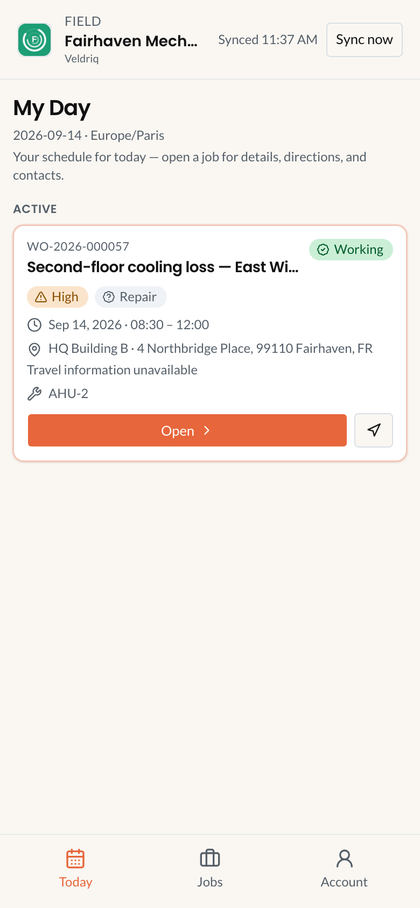
Field PWA job list. Sample data. Included with the web product.
Who can open it
Section titled “Who can open it”Active technician + field.workspace.view. HTTPS in production. Admins without an active technician profile cannot open Field.
Today, Jobs, Account. A job appears only if the work order is not Draft, the visit is dated, and this technician is assigned.
What technicians do
Section titled “What technicians do”See Field execution: Start travel / Start work, forms, evidence, signatures, findings, inventory usage as permitted, then Closeout Complete appointment. They do not create work orders, invent times, or office-Complete the work order.
Finish my work ends your assignment. It is not Closeout and not office Complete. See Work orders.
Offline
Section titled “Offline”Work can queue locally and sync while the PWA is open. A killed browser tab does not guarantee background sync. Native Field has its own offline engine — do not copy those claims here.
Limitations
Section titled “Limitations”No live GPS, no ETA, no killed-app sync guarantee. Native store binary is a different SKU. Veldriq does not support live GPS.
If Today is empty: work order still Draft; visit undated; you are not assigned; site timezone wrong. If you installed Add to Home Screen: that is still this PWA — not Veldriq Field.
Related: Field PWA troubleshooting.