Complete job
Complete job (Closeout section) completes the appointment when requirements are met. It is not office work-order Complete.
Screen path: job detail → More details → Closeout → Complete job. Confirm: Complete this job? — “This completes the appointment for the workspace. Finish My Work is separate.” Native Field is not the Field PWA.
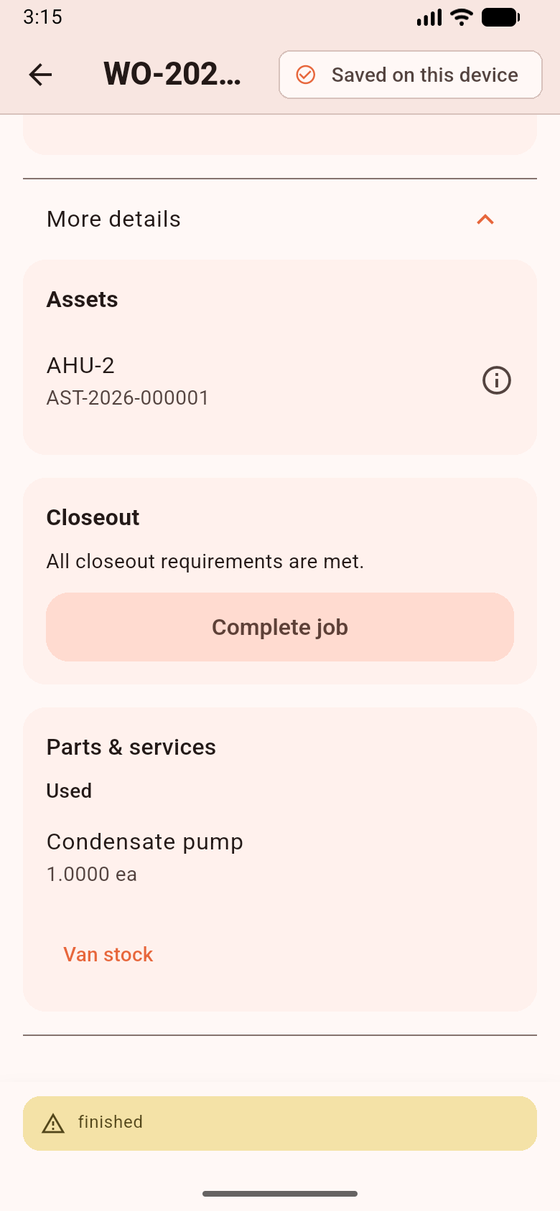
Closeout Complete job when requirements are met. Sample data. Used parts on this card are visit consumption, not a separate inventory screen.
Preconditions
Section titled “Preconditions”- All assigned technicians Finished
- Required forms completed
- Required evidence count (Before / After / General as the snapshot says)
- Required customer signature
- Related outbox items not stuck (forms/photos/signatures waiting to sync)
Ready copy: All closeout requirements are met. Blocked: This job cannot be completed yet. Flutter never sets can_complete = true locally and never force-completes.
Open findings do not block Complete job.
A service report may generate on the web side around appointment completion (queue worker). That is not a Field button. Visit entitlements consume on office Complete, not here.
- Execute on the dock until you can tap Finish my work.
- Expand More details → Closeout.
- Tap Complete job and confirm.
- Until the server confirms: Completion pending sync. That is not a final Closeout. Laravel re-checks requirements and can reject.
- Success chip in English: Completed (appointment — not office work-order Complete). Open Sync → Sync now.
What works / does not work
Section titled “What works / does not work”| Works | Does not work | |
|---|---|---|
| Offline enqueue | Yes | Local-only “done” |
| Open findings | Not a blocker | CAPA / auto follow-up WO |
| Entitlements / PDF share | Office / server | Buttons in this app |
If you cannot find Closeout: expand More details. If Complete job stays disabled after you finished: a teammate has not Finished, or a required form / photo category / signature is missing.
Related: Closeout blockers.