Execution lifecycle
Each assigned technician has an independent execution state. Several technicians can be Working on the same visit. Laravel remains the authority.
Screen path: job detail → bottom dock. The My work card is a summary only. Native Field is not the Field PWA and is not a timesheet product.
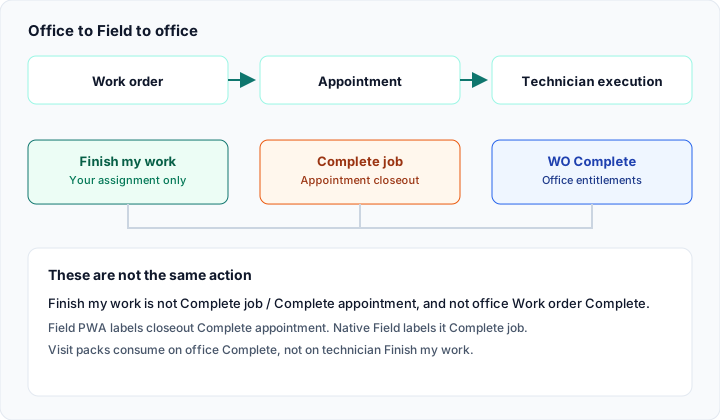
Assigned → travel/arrive (optional) → Working → Finish my work. Complete job is Closeout for the appointment.
Preconditions
Section titled “Preconditions”You are assigned on this appointment. Only actions in my_execution.allowed_actions appear. If a tap is not allowed: This action is not available in the current state. You cannot start a second job while another execution is En route, Arrived, Working, or Paused.
States and actions (English)
Section titled “States and actions (English)”| Status | You may tap | Next status |
|---|---|---|
| Assigned | Start travel or Start work (primary) | En route / Working |
| En route | Arrive or Start work | Arrived / Working |
| Arrived | Start work | Working |
| Working | Pause or Finish my work | Paused / Finished |
| Paused | Resume | Working |
| Finished | (none for you) | — |
On Assigned, Start work is the primary dock action. Start travel remains so you can go En route first. You cannot Finish from Paused — tap Resume first.
The first Start travel or Start work from any technician can move the appointment from Scheduled to In progress. Finish my work does not complete the appointment.
- Open the job. On the dock, tap the allowed action (typically Start work on Assigned).
- The app writes an outbox row
field.execution.transitionand updates the local job. You may see Pending sync / Saved on this device. - Fill forms and photos only while Working — copy: Start work before editing forms or photos.
- Finish my work, then More details → Closeout → Complete job when the team is done.
- Open Sync → Sync now when you have a network.
What works / does not work
Section titled “What works / does not work”| Works | Does not work | |
|---|---|---|
| Offline taps | Queue + local status | Treating local Complete as final |
| Several techs on one visit | Each has their own state | Finishing a colleague’s assignment |
| Timers on My work | Derived from event timestamps | Submitting a payroll timesheet |
| GPS | None | Location or ETA on travel |
If Start work is missing: you are not Assigned / En route / Arrived, another job is already active for you, or the office template hid the action. Check My work and Sync.
Related: Finish my work · Complete job.