Evidence
Evidence is photos on the visit. Take photo or Choose from gallery. Categories as the UI shows (Before / After / General). There is no caption field and no GPS on capture.
Screen path: job detail → Evidence. Native Field is not the Field PWA.
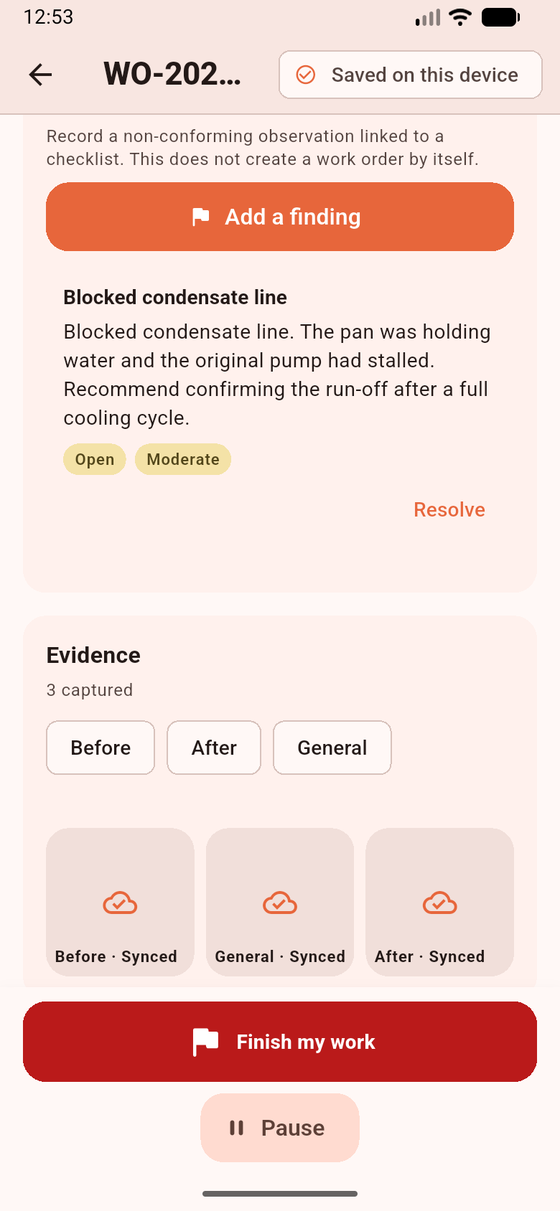
Evidence on the visit (Before / After / General). Sample data. The finding above the photos is listed on the same job card; photo capture is this Evidence block.
Preconditions
Section titled “Preconditions”You must be Working — Start work before editing forms or photos. Camera and Photo Library only. No GPS, microphone, or broad storage permission. Android uses the system Photo Picker. Close the barcode scanner before opening the photo picker.
A General photo does not satisfy a Before or After Closeout requirement unless the snapshot requirement is itself general.
- Start work if needed.
- On Evidence, choose Before, After, or General.
- Tap Take photo or Choose from gallery. There is no caption UI.
- Wait until the app has copied the file to private storage. Disk failure is an error, not a silent “saved.” Status: Waiting to upload, Upload failed, or Synced.
- You can delete unsynced photos only. Retry from Sync — do not recapture unless the row says the file is missing.
Accepted types: JPEG, PNG, GIF, WebP. HEIC is rejected (“HEIC photos are not supported. Use JPEG or PNG.”). Too large: “This photo is too large to upload.” Historical server photos are not bulk-downloaded at first sync.
What works / does not work
Section titled “What works / does not work”| Works | Does not work | |
|---|---|---|
| Offline capture | Private file + Waiting to upload | HEIC, captions, GPS stamp |
| Delete | Unsynced only | Already Synced photos |
| Uninstall before Synced | File lost | Reconstructing from the server |
Privacy: files are tenant evidence after the server accepts them. Do not publish customer photos in tickets.
If Closeout still asks for Before after you took General: categories are not interchangeable. If Delete is missing: the photo already synced.
Related: Signatures · Sync Center.