Forms
Forms are the visit checklists assigned from the office work-order type. Native Field does not invent templates. Submit form is not Closeout and does not complete the appointment.
Screen path: job detail → Forms → form row. If workspace capability forms is off, this card is hidden. Native Field is not the Field PWA.
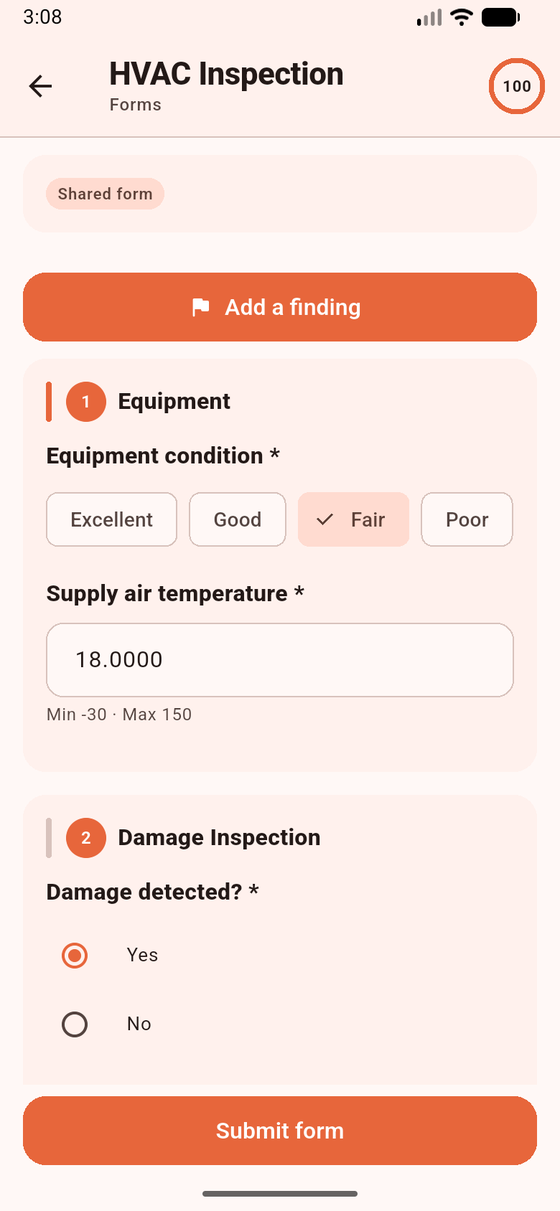
Form instance on a visit. Sample data. Completing a form is not Closeout. Add a finding on this screen opens Findings — it is not the evidence camera.
Preconditions
Section titled “Preconditions”You must be Working. Otherwise: Start work to fill this form. (Photos use Start work before editing forms or photos.) Office templates decide which checklists ride with the appointment.
- On job detail, open Forms.
- Tap a form row. Scope chips: Shared form vs Your form (per technician). States: Not started, In progress, Pending sync, Completed, Needs attention.
- Fill fields. Drafts debounce-save on the device. There is no photo, file, signature, or barcode field type on a form, and no asset picker.
- Tap Submit form when required fields are done. That enqueues
field.form.complete. You can also tap Add a finding from the form (you must pick a Checklist). - Open Sync if the row stays on Pending sync.
Supported field types: checkbox, text, long text, number, single select, multi select, radio, date, time, datetime, section, instruction. An unknown type is shown as incompatible — it is never omitted silently.
The server treats a completed form instance as immutable. Drafts live outside the job JSON so a bootstrap / pull cannot wipe them.
What works / does not work
Section titled “What works / does not work”| Works | Does not work | |
|---|---|---|
| Offline draft + submit | Yes (queued) | Photo / signature / barcode on the form |
| Hidden required field | Not blocking | Silent skip of unknown types |
| Submit every required form | Closeout precondition when the snapshot says so | Complete job itself |
If you cannot type: you are not Working. Use the dock Start work. If you expected a photo field on the form: use Evidence.
Related: Form versions · Findings.